I moved to a new URL! Check it out!

Doodle Post

Image

A Flashpunk 9-Slice Object

A Flashpunk 9-Slice Object
As I've been working on this Global Game Jam game remake, I've been trying to come up with solutions for problems that I can hopefully reuse for more projects in the future. One of the things I've been thinking a lot about is managing and drawing the various user interfaces for the game. Even though I'm not quite sure how much UI stuff this game will need, I wanted to have some sort of solid base to start with so that I could get stuff up and running quickly.

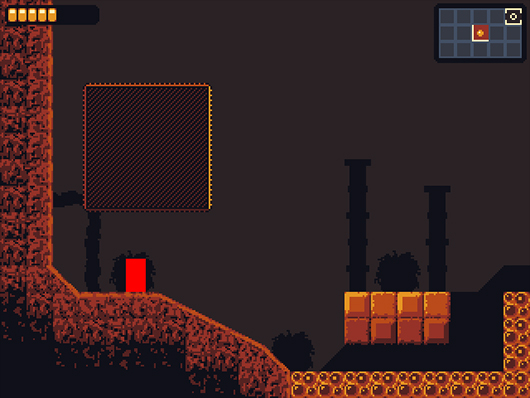
One of the most basic core structures of drawing a cool UI (in my opinion!) is a 9-slice graphic object. What's a 9-slice graphic object?! Well, here's a quick example of one that I have working in Flashpunk right now.

Image

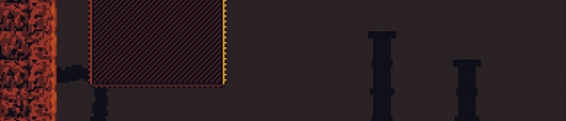
The box that is being drawn above the red player rectangle is a working example of my NineSlice class. It's being drawn from a source image of nine tiles. The source file has four tiles for the corners, four tiles for the sides, and one tile for the center. Here's what the source looks like (blown up 4x because it is tiny.)

Image

This is incredibly useful because it's now possible for me to draw stylized boxes for potential UI components at any size without having to draw each one individually. One thing that I wish that I had spent more time on in Offspring Fling is the UI for the menus, so in the future I want to make my menus and interfaces as awesome as they can be, and having some functions do a lot of the fancy work for me is a big step in that direction. Here's what it looks like right now: NineSlice.as

Here are some snippets of code from the example shown above:
//initial set up
private var nineSliceTest:NineSlice = new NineSlice(Assets.IMG_NINE_SLICE_TEST, 3, 3, 3, 3);
//in the entity's constructor
nineSliceTest.scrollX = nineSliceTest.scrollY = 0;
nineSliceTest.width = 40;
nineSliceTest.height = 40;
nineSliceTest.x = 50;
nineSliceTest.y = 50;
//in the entity's render function
nineSliceTest.render();
Right now this is a very rough first pass on this kind of thing. Ideally it would be some sort of Flashpunk graphic extension that would plug directly into the Flashpunk rendering system. For now it makes use of the Flashpunk Draw class, and some utility functions that I've written for myself. Feel free to use it or improve it, and if you end up improving it then let me know!

Dev Log: Some More Camera Stuff

Dev Log: Some More Camera Stuff
I'm feeling pretty exhausted today so this post will probably be pretty short. Last week I posted about working on some camera stuff for platforming in Flashpunk. I made a few adjustments to the way my camera worked based on some more stuff I observed from Mario World and Yoshi's Island.

Image

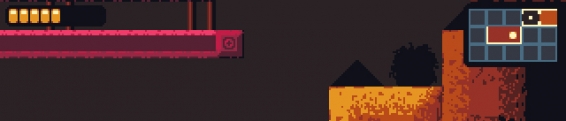
I changed around how some of the horizontal camera stuff works. Now you have some wiggle room before the camera starts to move at all horizontally. The look ahead also works slightly better than before. If you're pushing up against the side of the wiggle-area, the camera will slowly look ahead in the direction you're pushing. If you're moving in that direction, the speed in which it looks ahead increases so that you'll hopefully always be able to see what's coming down the line if you're moving fast.

The vertical movement is more or less the same. The camera only catches up to you when you're on a platform, or if you're pushing the margin of the screen with jumping or falling. The falling margin of the screen is much higher, since usually if you're falling you want to see a little bit downward. One thing I did change was the camera's natural target point in the y direction. Now if the camera thinks you're moving upward a lot, it will look above the player somewhat. If you're moving down though, it will look directly at the player again. Looking somewhat above the player ends up looking nice in most platformers because locking on in the center usually means showing 50% of the screen as solid ground with the most basic camera behavior.

I have run into some snags along the way... right now I need to figure out how to handle camera blocking better. Camera blockers are necessary for a game like this to hide secret areas, and I don't want to reveal them until the player actually crosses into the secret area. At the point in which the player crosses the blocker, the camera will then be unlocked and catch up to its target position again. This worked fine up until the point in which I made the player camera more complicated... I might have to do some tinkering to get it working just the way I want, but also in a clean and reusable way.

Okay that's all for now! (PS The Flashpunk website is still down, but once it comes back up all my links to it will work again! Also if you're looking for just the code, check out the Git repository.)

Doodle Post

Image

Lyle in Cube Sector Any% Speedrun

Lyle in Cube Sector Any% Speedrun
Now for something completely different!


Sometime over the past month I was inspired to do a speed run of a game but I couldn't figure out exactly what game I wanted to do. After some soul searching I landed on Lyle in Cube Sector. Lyle is a game released in 2006 and was one of the first "indie" games to really blow my mind. It was a complete metroidvania, and it was made in Multimedia Fusion which I didn't think was possible. Lyle would later go on to inspire me enough to actually finish my next game, which turned out to be Bonesaw: The Game.

If you've never played Lyle you should totally check it out. The game is a bit brutal at first. Everything hurts you, enemies are complete dicks, and you don't have a lot of health to play around with, but it's definitely worth sticking through all that and getting to the end.

Now I'll get back to work!

Dev Log: Platforming Camera

Dev Log: Platforming Camera
Chipping away at things in my remake of my Global Game Jam game. Now that I have more than 48 hours to make the game, I've been taking some time to figure out some things that I've been neglecting for the past couple years of making short form game jam games.

In Offspring Fling, there is very little scrolling. I think only one level actually scrolls both horizontally, and vertically. On top of that there are still only a few levels that scroll at all. This means that I didn't really have to worry about a complex camera, I just have the camera follow the player with a little bit of a drag and it works out mostly fine.

For this new game I'm working on, there's a bit more platforming, and almost every level will have scrolling in it, and there will be some big and open rooms... so I want to have a better camera system in general to handle platforming.

What do I mean by this? Take a look at this breakdown of the camera system from Mario World.


This kind of camera system is pretty crazy. There's a lot going on behind the scenes to make sure that the camera is showing the player exactly what they need to see. This is definitely one of those things where if you do it right, nobody will notice you're doing anything at all, but it is incredibly difficult to get this kind of stuff right.